Can't Control TV with JubileeTV Remote
Overview
This guide covers what to do if your JubileeTV Remote is not reliably controlling the following basic TV hardware functions:
- Power (On/Off)
- Volume (Up/Down)
- Mute
The three functions above are the only commands JubileeTV sends directly to the TV itself. All other functions are sent to the source devices (e.g., cable/satellite set-top box, media player such as Roku, etc.) configured to your Console.
Because of this, the JubileeTV remote cannot be used for TV-specific operations, such as:
- Navigating your TV's native menus or accessing TV settings.
- Using apps installed directly on your TV (to use apps, they must be run through a connected source device like a Roku or Apple TV).
- Changing channels on a TV that has a direct cable or antenna feed.
Note: Other commands like Channel Up/Down, the D-pad (up, down, left, right arrow buttons), Guide, etc. are sent from the JubileeTV Console directly to your source device, not the TV. If your Power and Volume buttons work, but these buttons do not, please see: Can't Control Source Device with JubileeTV RemoteCan't Control Source Device with JubileeTV Remote.
Before you Start Troubleshooting
Before diving into hardware troubleshooting, please verify that one of these common scenarios isn't causing the issue.
1. Test Remote Battery
- JubileeTV Remote: Press a button on the remote that came with your Console. Does the red LED at the top of the remote light up? If it doesn't, replace the batteries.
- 6-Button Remote: Press a button on the 6-Button Remote. Do the buttons light up? If they don't, replace the batteries
2. Check Usage Mode (Passive Mode Implications)
When the system is set to a Passive Mode, certain buttons—or entire remotes—are deactivated by design to simplify the user experience. Check your system's current Usage Mode to ensure your remote is actually supposed to be active:
Usage Mode | JubileeTV Voice Remote | 6-Button Remote |
|---|---|---|
Interactive Mode | ✅ Active (Power, Volume, & Mute can control the TV) | ❌ Deactivated |
Passive Mode with Original Remote(s) | ❌ Deactivated | ❌ Deactivated |
Passive Mode with Simplified JubileeTV Remote (remote cover) | ✅ Active (Power, Volume, & Mute can control the TV) | ❌ Deactivated |
Passive Mode with 6-Button Remote | ❌ Deactivated | ✅ Active (Power, Volume, & Mute can control the TV) |
- If you are in a Passive Mode: Check the table above. If your current mode intentionally deactivates your remote, it isn't broken! Simply change your Usage Mode if you want to use that specific remote.
- If you are in Interactive Mode (or a supported Passive Mode): Proceed directly to the troubleshooting steps below.
(For more on Usage Modes and how to check your system's current configuration, see JubileeTV Usage ModesUsage Modes).
3. Is your TV on the wrong input?
If your TV is showing its own "Smart TV" menu or a different HDMI input:
- Make sure that CEC is enabled on your TV (if available). See The TV is not on JubileeTV's HDMI port.
- Press the Blue J Button. The Console will attempt to "force" the TV back to the correct JubileeTV input.
- If the screen does not change, see Setting Your TV to Start on JubileeTVSetting the TV Input for steps on how to lock your TV to the JubileeTV source.
4. Did your remote suddenly stop working?
If your remote was working previously but suddenly stopped, this is most likely a line-of-sight issue.
- JubileeTV Remote: Skip directly to Verify Console-to-TV Line of Sight.
- 6-Button Remote: Skip directly to Verify Remote-to-Console Line of Sight.
Troubleshooting Steps for JubileeTV Remote
Proceed below if your system is in Interactive Mode or Passive Mode with Simplified JubileeTV Remote (remote cover).
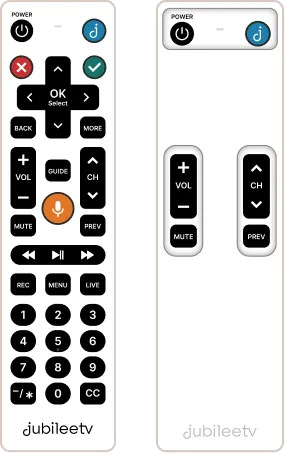
1. Restart the JubileeTV Console
A simple "power cycle" often resolves communication issues between the Console and the TV.
Restarting in person
- Unplug the power cable from the back of the JubileeTV Console.
- Wait 30 seconds to allow the memory to clear.
- Plug the Console back in and wait for the system to fully reboot.
- Test: Use the physical JubileeTV remote to try the Power, Volume, and Mute buttons.
Restarting remotely
If you are problem solving remotely, you can trigger a restart through the App:
- Press the Gear icon next the room name on the Home Screen
- Press Details
- Select "Restart Console"
- Test: Once the reboot is complete, try the Power, Volume, and Mute buttons from Telescope.
- If power/volume controls work through Telescope, ask your loved one to test the same buttons on the JubileeTV remote. If power/volume work via Telescope, but do not work when sent from the JubileeTV remote, continue to Verify the Remote-to-Console Connection.
- If power/volume controls do not work through Telescope, skip to Verify Line of Sight.
2. Verify the Remote-to-Console Connection
Ensure the JubileeTV remote is talking to the Console.
- The Console LED Test: Press any button on the JubileeTV remote. If the third LED on the Console (third farthest away from the camera) blinks green every time a button is pressed, this means your remote is connected.
- The "Blue J" Test: If you're in Interactive Mode, press the Blue J button. If the JubileeTV home screen appears on your TV, your remote is connected.
- Check the App: If you are the Primary Admin or a Contact Admin, you can reliably check the remote-to-Console connection by going to Hub Settings:
- Select the gear icon to the right of the room name on the app home screen.
- Select the Details tab.
- Scroll down to the Remote section and check the remote Status.
If your remote is disconnected
See if the solutions below establish the remote-to-console connection.
- Replace Batteries: Insert fresh batteries. The remote should reconnect automatically.
- Manual Pairing: Press and hold the Blue J and Back buttons together until the light at the top blinks rapidly. Watch for a "Remote Connected" message on the TV.
(If you were unable to establish the connection, please contact Support. If connected but you still cannot control your TV, continue to step 3 below).
3. Verify Console-to-TV Line of Sight
The JubileeTV Console communicates with your TV using light signals (IR) sent from the Console to your TV. Physical blockages are the most common cause of control issues.
Step 1: Clear the Path
Ensure there are no physical obstructions—such as decor, books, or closed cabinet doors—blocking the front of the JubileeTV Console or the front of your TV. IR signals require a clear "line of sight" to function.
Step 2: Adjust Device Positioning
If the Console is tucked inside a shelf or behind other equipment, pull it forward toward the edge. This allows the Console to better emit the IR signals into the room so they can bounce off walls and reach the IR receiver on your TV.
Step 3: Install IR Blaster Cables (Recommended)
For the most reliable connection, use the IR Blaster cable included with your JubileeTV. This provides a direct path for the signal to reach your TV, eliminating the need for signals to bounce off walls or furniture to reach your TV's receiver.
- Connect to Console: Plug the IR Blaster cable into the port on the back of the JubileeTV Console.
- Position the Emitter: Place one of the small, dome-like emitters on the shelf directly in front of your TV's IR receiver window.
- Tip: The IR receivers on TVs are often located at the bottom of the screen.
- Perform a Control Test: Use the JubileeTV remote to see if it now controls the TV (try power on/off, volume up/down, and mute).
- Secure the Emitter: Once control is confirmed, use the adhesive backing to stick the emitter in place.
Note: The IR blaster cable includes two emitters. If your source device(s) communicate via IR, we recommend placing the second emitter directly in front of the IR receiver window of your device to ensure consistent control.
4. Verify TV Configuration
If the Console is configured for the wrong TV, it will send signals that your television cannot understand. This typically happens if the wrong brand was selected during initial setup or if the TV has been replaced.
To check your configuration
- Open Console Settings:
- Using the JubileeTV Remote: Press GUIDE three times, then the Blue J button once.
- Using the App (Telescope): Open Telescope, select the Actions tab, and select Settings under JubileeTV Destinations.
- Select Devices.
- Select your TV on the HDMI Out row.
What to do next based on your setup:
- If the TV brand is incorrect: Select Reset TV Configuration and follow the on-screen instructions to select the correct brand.
- If the TV brand is correct, but the TV was changed recently: Select Reset TV Configuration and follow the on-screen instructions to ensure the Console is using the correct codes for your new model.
- If the brand is correct and the TV was not recently changed: Select Control Settings > Test JubileeTV Remote to verify and test the current communication codes.
Troubleshooting Steps for 6-Button Remote
Proceed below if your system is in Passive Mode with 6-Button Remote.
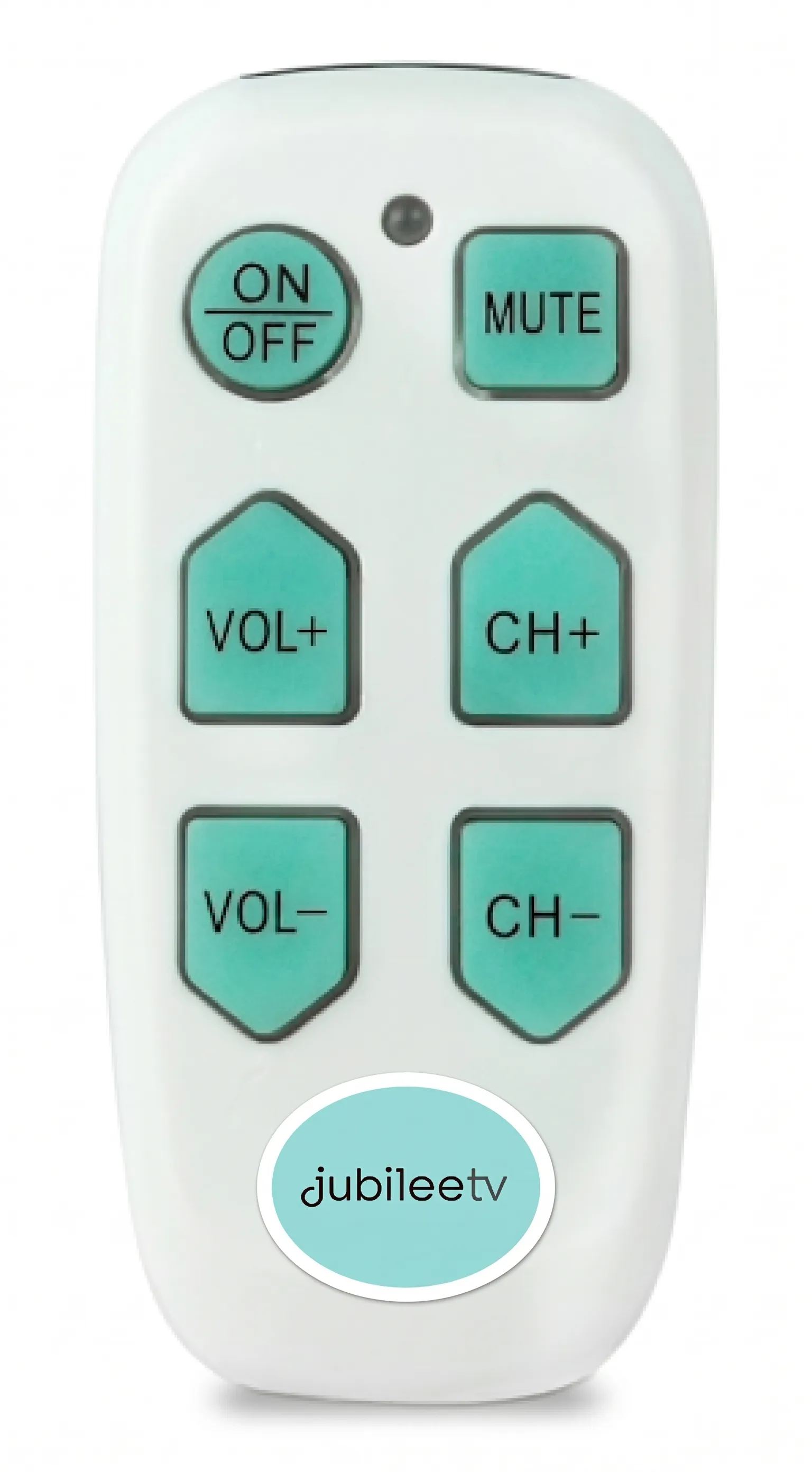
1. Confirm you purchased the 6-Button Remote directly from our website
IMPORTANT: Only 6-Button Remotes purchased directly from JubileeTV will work with your Console. Remotes from other retailers are not compatible.
See 6-Button Remotea for more details.
Purchase the 6-Button remote here.
2. Verify Remote-to-Console Line of Sight
The 6-Button Remote communicates with your Console using light signals (IR). To test if the signal is reaching the Console:
To test if the signal from your remote is reaching the Console:
- Point the 6-Button remote towards your Console.
- Press a button on the remote.
- Does the third LED (Remote LED) on the Console blink every time a button is pressed?
- If the Console LED blinks, this means your 6-Button Remote is communicating with the Console. Please proceed to step 4.
- If the Console LED does NOT blink, this means your 6-Button Remote is faulty. Please contact Support to get it replaced.
3. Verify Console-to-TV Line of Sight
The JubileeTV Console must have a clear path to send IR signals to the TV.
Step 1: Clear the Path
Ensure there are no physical obstructions blocking the front of the JubileeTV Console or your TV.
Step 2: Adjust Device Positioning
If the Console is tucked inside a shelf or behind other equipment, pull it forward toward the edge to ensure IR signals can reach the TV.
Step 3: Install IR Blaster Cables (Recommended)
For the most reliable connection, use the IR Blaster cable included with your JubileeTV. This provides a direct path for the signal to reach your TV, eliminating the need for signals to bounce off walls or furniture to reach your TV's receiver.
- Connect to Console: Plug the IR Blaster cable into the port on the back of the JubileeTV Console.
- Position the Emitter: Place one of the small, dome-like emitters on the shelf directly in front of your TV's IR receiver window.
- Tip: The IR receivers on TVs are often located at the bottom of the screen.
- Perform a Control Test: Use the JubileeTV remote to see if it now controls the TV (try power on/off, volume up/down, and mute).
- Secure the Emitter: Once control is confirmed, use the adhesive backing to stick the emitter in place.
Note: The IR blaster cable includes two emitters. If your source device(s) communicate via IR, we recommend placing the second emitter directly in front of the IR receiver window of your device to ensure consistent control.
4. Verify TV Configuration
If the Console is configured for the wrong TV, it will send signals that your television cannot understand.
Note: You cannot access Console Settings using the 6-Button Remote. To complete the steps below, please use either the JubileeTV App (Telescope) or the JubileeTV Remote that came with your Console.
To check your configuration
- Open Console Settings:
- Using the JubileeTV Remote: Press GUIDE three times, then the Blue J button once.
- Note: You must use the JubileeTV Remote that came with your Console (not the 6-Button Remote).
- Using the App (Telescope): Open Telescope, select the Actions tab, and select Settings under JubileeTV Destinations.
- Select Devices.
- Select your TV on the HDMI Out row.
What to do next based on your setup:
- If the TV brand is incorrect: Select Reset TV Configuration and follow the on-screen instructions to select the correct brand.
- If the TV brand is correct, but the TV was changed recently: Select Reset TV Configuration and follow the on-screen instructions to ensure the Console is using the correct codes for your new model.
- If the brand is correct and the TV was not recently changed: Select Control Settings > Test JubileeTV Remote to verify and test the current communication codes.
Still need help?
If the steps above do not establish control of your TV, please contact JubileeTV Support.