JubileeTV App
Overview
Whether you’re across town or across the country, the JubileeTV App is your command center for supporting a loved one from your smartphone, tablet, or browser.
Designed for family caregivers, the app allows Primary Admins, Contact Admins, and Contacts to stay connected and manage the TV experience for the TV End User.
Ways to Access the JubileeTV App
- Mobile: Download on the App Store or Google Play Store.
- Web Browser: Log in at app.getjubileetv.com.
The Account Menu (Top Right)
Accessed via the three dots (⋯), this menu houses global settings. Available options depend on your User Roles & Permissions & Permissions,.
Available to All Contacts
- My Profile: Update your name, profile photo, email address and more.
- JubileeTV Member Community: Join our Facebook group to share tips with other families.
- Notifications: View a history of past alerts and in-app messages.
- Learning Hub: Access installation guides and video tutorials.
- Hep & Support: Direct link to our Support Center and customer service.
- Log Out: Securely exit your account.
Available to Admins Only
- JubileeTV Usage ModesUsage Mode: Set the system-wide Usage Mode to best suit the TV End User's needs.
- TV Interface SettingsTV Interface Settings: Fine-tune the TV End User's permissions/settings and toggle system-wide messaging on or off.
- Membership & Service PlanMembership & Service Plan (Primary Admin Only): Update billing, manage your Service Plan, and more
The Home Screen
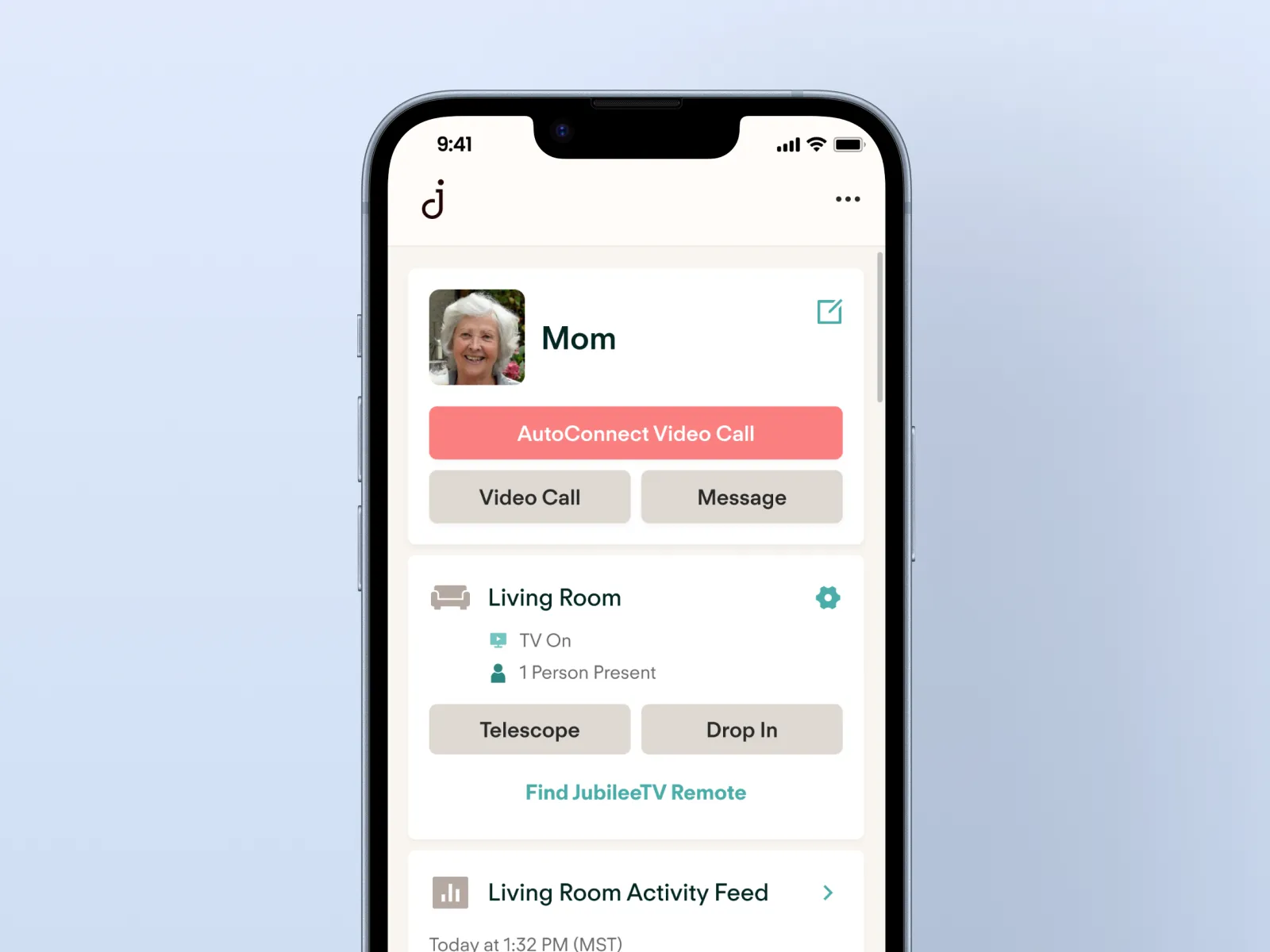
The home screen is organized into Cards that provide quick access to communication and management tools.
Resident Card
Identified by your loved one’s name and photo, this is your primary communication hub.
- Video CallingVideo Call: Initiate standard or AutoConnect video calls.
- Messaging: Send and receive messages directly to the TV.
- Editing TV User InformationEditing TV End User Information: Update the TV End User's name or profile picture.
Hub (Console) Card
Provides real-time status and remote control for the JubileeTV hardware. You will see one card for every Console configured on the account.
- TelescopeThe Telescope button: Remotely see and control the TV from your app.
- Drop InThe Drop In button: Securely activate the Console camera and mic for a quick check-in.
- Find JubileeTV Remote: Play a chime to locate a misplaced JubileeTV remote.
- Status Indicators: View real-time TV power state (On/Off) and Presence Detection.
- Hub Details & Settings: Accessed via the gear icon (⚙️) to the right of the room name, this area is where you manage the technical and content preferences for a specific JubileeTV Console. The Hub menu is organized into three primary tabs:
- FavoritesFavorites: Customize the TV experience by managing Channel Favorites and App Favorites.
- Hub SettingsSettings: Fine-tune the behavior of this specific Console.
- Hub Details: Access technical specifications (such as Serial Number and Firmware version) or perform a Remote Restart of the Console if troubleshooting is required.
Activity FeedActivity Feed Card
Monitor the TV End User's daily routines at a glance. View a 2–3 hour timeline of TV usage and presence detection directly on the home screen, or tap the card to access the full Activity Feed history.
Note: One card is displayed for every configured JubileeTV Console.
Photos & VideosPhotos and Videos Card
Manage the photo and video library from here. Send new photos and videos, delete old ones, and add/remove photos from the Slideshow.
Memories Card
The central hub for your library of Family Stories and Moments. From this card, you can revisit and share recorded memories or capture new ones.
- Family Stories: Create a Family Story directly from this card—you can share a photo or prompt with your loved one and record their response during a video call.
- Moments: View and share short, candid clips captured during video calls.
Stay in Touch Card
A personal dashboard to track how often you’ve called, messaged, or sent pictures. You can also Stay in Touch Reminders to ensure consistent connection.
Voice Insights Card
Access Voice Insights[Voice Insights] (formerly Voice Biomarkers) assessments to monitor wellness trends over time.
Contacts Card
Manage the circle of care. Admins can adjust User Roles & Permissions[Roles & Permissions] for all users linked to the account. All Contacts with the exception of the Primary Admin can unlink their JubileeTV account from the TV End User here as well.
Feedback Card
Submit suggestions or report issues directly to our team.