Adjusting Console Settings
The Console Settings menu has different options depending on your hardware.
Which Console do I have?
This guide is for you if your Console looks like the one below outlined in blue.
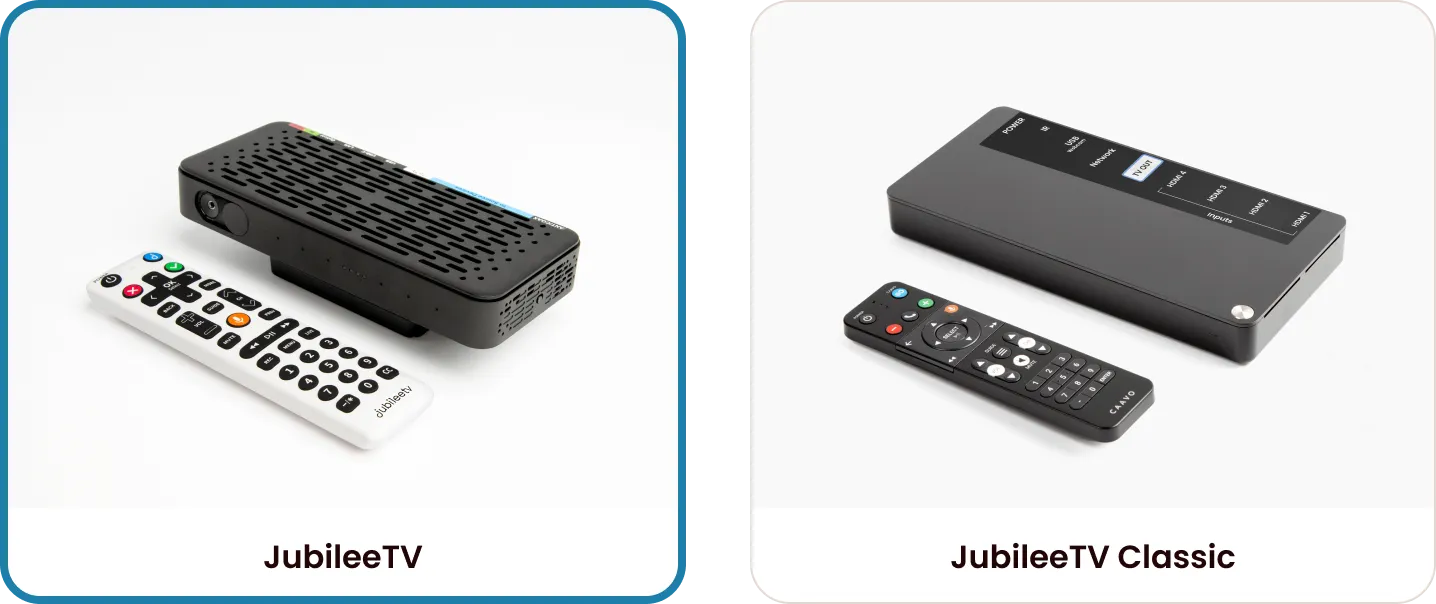
In August 2024, JubileeTV released a new Console model. Please check your hardware before proceeding:
- JubileeTV Console (Newer): If your console is designed to be mounted on top of your TV, this guide is for you.
- JubileeTV Classic (Original): If you have the original hardware purchased before August 2024, see Adjusting Console Settings (Classic)a
What can I do in Settings?
The Settings menu allows you to manage the technical aspects of your JubileeTV experience, including:
- Changing or adding source devices (Cable/satellite set-top-box, Roku, etc.)
- Updating Wi-Fi or Network configurations
- Re-pairing your JubileeTV remote
How do I open settings?
You can access Settings on the JubileeTV Console in one of three ways:
Using the JubileeTV Remote
- Press and hold the Orange voice button on the JubileeTV remote and say "settings."
- Note: The Console must be online
- Press the GUIDE button three times rapidly and then press the blue J button once on the JubileeTV remote.
Using Telescope
- Start a Telescope session from the JubileeTV App.
- Select the Actions tab.
- Select Settings under JubileeTV Destinations.
Settings Overview
General
Setting | Description |
|---|---|
Zip Code | Change the location of the Console. If you are using a cable/satellite set-top box as a source device, this settings also supports the options you are presented with for a channel lineup. |
Screen Calibration | If the JubileeTV UI on the TV does not fill the entire space, you can use this setting to adjust the size of the UI. |
Camera Calibration | Use this tool to test the camera placement and microphone. |
Voice Biomarkers | Enable or disable Voice Biomarkers. |
Devices
In the Devices section of Settings, you can Add, Change or Remove a Source Deviceadd/remove or Configure a new TVc.
Understanding the Device List
Devices are organized by their physical connection to the JubileeTV Console:
- Source Devices (Inputs 1, 2, and 3): These appear at the top of the list (e.g., your cable/satellite set-top box, Roku, or DVD player).
- Output Device (TV): This appears at the bottom and is labeled with your TV's brand name.
Source Device Settings
Upon selecting a source device, you will be presented with varying options depending on the type of a source device. Each source device will have a Change Device option. More on changing devices can be found in Add, Change or Remove a Source Devicea
TV Output Settings
Select your TV brand at the bottom of the list to manage how JubileeTV interacts with your television. Key options include:
- Control Settings
- Allows you to change the way in which the JubileeTV Console controls your TV.
- Calibrate Comfortable Volume Level
- Sets the comfortable volume level used during Telescope sessions.
- Calibrate TV Power Monitoring
- Calibrate JubileeTV to reliably determine if the TV is on or off.
- Reset TV Configuration
- Forgets the setup of your specific TV and sets up your new TV.
- Related: Configure a new TVa
Network
In the Network section of Settings, you can adjust the way in which the JubileeTV Console connects to the internet. You are able to change/add/remove a Wireless Network or Wired Network from the Network section. You also will see various values, such as Status, Network Name, Signal Strength, IP address, MAC address and GHz band.
Useful Related Articles
Remote
In the Remote section of Settings, you will see the battery level of your JubileeTV remote, the MAC address of the remote and the version of the remote. If you need to pair a new remote to your JubileeTV Console, you can do so here.
Restart
To restart your JubileeTV Console, click Restart in Settings.
About
In the About section of Settings, you will see high-level technical information about your Console including the firmware version and device information. You can also generate a log file for our Support Team from this section, if you are ever asked to.
Factory Reset
This restores the Console to pre-setup state. See Factory Resetting the Consolefa for more details.