Remote Covers
4 min
Overview
JubileeTV offers three distinct covers that snap directly onto the Voice Remote to hide unused buttons. By using the bare remote or adding one of these covers, the JubileeTV remote can be customized into four distinct configurations based on the TV End User's needs and media setup.
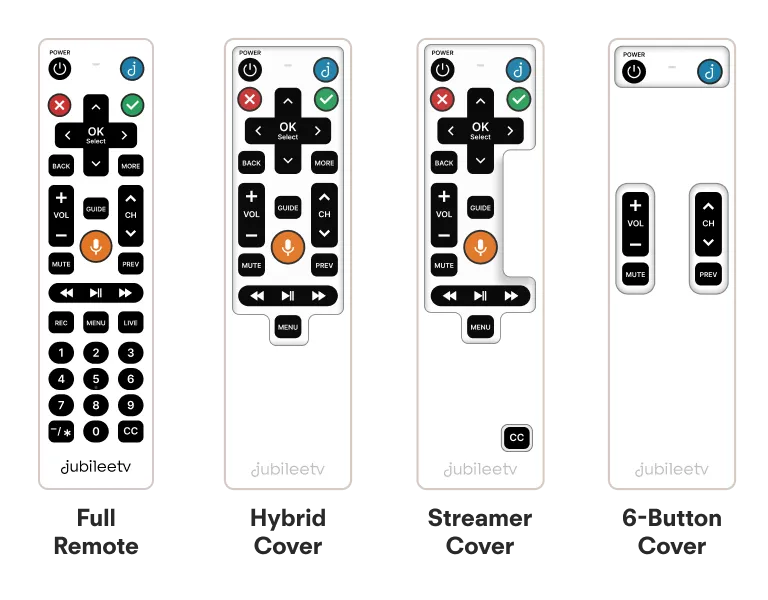
Full Remote (No Cover)
- Best For: TV End Users who want access to the full JubileeTV remote experience.
- Usage Mode: Interactive Mode.
- Ideal Setup: Any configuration where the user is comfortable navigating all buttons and on-screen interactions.
Hybrid Cover
- Best For: Dual-source setups that include both a media streamer (e.g., Roku, Apple TV, Fire TV) and a cable/satellite set-top box.
- Usage Mode: Interactive Mode.
- Ideal Setup: Gives the TV End User a slightly simplified physical remote while maintaining access to the specific buttons needed for both of these source devices.
Streamer Cover
- Best For: Setups where a media streamer (e.g., Roku, Apple TV, Fire TV) is the primary source device.
- Usage Mode: Interactive Mode.
- Ideal Setup: Hides traditional buttons that aren't used for streaming interfaces, such as the number pad and channel control buttons.
6-Button Cover
- Best For: Users who need the simplest possible experience and are using a single source device (must be a cable/satellite set-top box).
- Usage Mode: Passive Mode—Simplified JubileeTV Remote.
- Ideal Setup: Unnecessary buttons are completely hidden. Because this operates in Passive Mode, the channel up/down buttons are locked to only cycle through pre-set Favorited channels.
Related Article: JubileeTV Usage ModesUsa
Ordering Remote Covers
As of August 2026, all three remote covers are included as standard accessories in new JubileeTV shipments.
If you purchased your JubileeTV system prior to this date and would like to add one of these remote covers to your setup, please order using the links below: